
Google Merchant Center setup guide
Google Merchant Center helps online retailers provide product and business information to Google. For a WooCommerce store, it can become an important part of managing product visibility across supported Google surfaces and connected advertising services.

Creating an account is only the beginning. A reliable Merchant Center setup also requires accurate business information, a verified website, clear customer policies, properly configured shipping and return details, and a well-maintained product catalogue.
PW Merchant is designed to help WooCommerce store owners manage product reviews and supported Merchant API operations after the essential account and website preparation has been completed.
This guide explains the main steps you should review before connecting PW Merchant to Google Merchant Center.
What is Google Merchant Center?
Google Merchant Center is a platform where businesses manage information about their online store and products.
The account can contain details about the business, website, product data sources, shipping services, return policies and connected Google services.
Product information can be provided to Merchant Center through different methods. These methods may include automatic website-based sources, e-commerce platform connections, uploaded files, XML or text feeds, Google Sheets, manual product entry and API-based integrations.
PW Merchant uses an API-oriented workflow to help WooCommerce users review and manage supported product operations more directly.
The Merchant Center account remains a separate Google service. PW Merchant does not replace it. The plugin creates a more manageable connection between WooCommerce product data and the supported Merchant workflow.
What you need before creating an account
Before starting the Merchant Center setup, prepare the basic information required to represent your business accurately.

You should normally have:
- An active Google account controlled by the business
- A functioning WooCommerce website
- A secure website using HTTPS
- Clear business and contact information
- Accessible product pages
- Accurate product prices
- Current stock information
- A published shipping policy
- A published return and refund policy
- A privacy policy
- Terms and conditions where relevant
- A reliable customer contact method
Do not begin the setup with temporary, incomplete or inconsistent business information.
The company name, website address, contact details and customer policies should represent the actual business operating the WooCommerce store.
A Merchant Center account should reflect the real business, the real website and the actual conditions offered to customers.
Choosing the correct Google account
Use a Google account that the business can control over the long term.
A personal account owned by a temporary employee, outside agency or former service provider may create access problems later.
The primary account should ideally be controlled by the business owner or an authorised administrator.
Additional users can be added according to operational requirements, but access should be granted carefully.
Before continuing, check:
- Who owns the Google account?
- Can the business recover the account?
- Is two-step verification enabled?
- Are recovery email and telephone details current?
- Does the account already manage another Merchant Center?
- Will an agency require separate access?
Secure account ownership is important because the Merchant Center account may later be connected to other Google services and business processes.

Creating the Merchant Center account
During account creation, provide the requested business details accurately.
The exact interface may change over time, but the setup normally includes information about the business name, operating country, website and available sales methods.
Use the name customers recognise on your website and official business pages.
Avoid entering promotional phrases or unrelated keywords as the business name.
The selected country and business settings should match the actual area in which the store operates.
When the account is created, review the account interface before adding products. Complete the outstanding setup tasks rather than moving directly to product submission.
Adding accurate business information
Business transparency is important for customer trust and Merchant account quality.
Your website and Merchant Center account should present consistent information.
Review the following areas:
- Business name
- Business address where required
- Customer service email address
- Telephone number
- Website address
- Operating country
- Customer support hours
- Legal business information where applicable
The information should not conflict with details displayed on the website, invoices, policy pages or other official business channels.
Customers should be able to identify who operates the store and how they can request assistance.
Preparing the WooCommerce website
The website should be complete, functional and ready for customers before products are connected to Merchant Center.
A site that is still under construction, contains placeholder pages or has incomplete checkout functions should be corrected before proceeding.
Review the website as a new customer would.
Check whether visitors can:
- Understand what the business sells
- Open product pages without errors
- View accurate prices
- See whether products are available
- Add products to the basket
- Reach the checkout process
- Find shipping information
- Read the return and refund policy
- Find business contact information
- Use the website securely on mobile devices
The website should not contain broken menus, inaccessible policy pages, test products or misleading information.
Verifying and claiming the website
Website verification confirms that you have authorised access to the online store connected to the Merchant Center account.
Google may offer several verification methods depending on the website and account environment.

Available methods may include:
- Verification through an e-commerce platform
- Email-based verification where supported
- An HTML tag added to the website
- An HTML file uploaded to the server
- Google Tag Manager
- Google Analytics
Select a method that can remain stable after verification.
For example, when using an HTML tag, do not remove the tag immediately after the process has completed. Removing verification elements or changing administrator access may create future verification problems.
Enter the correct canonical version of the store address. Review whether the website uses HTTPS, whether it includes “www”, and whether redirects consistently lead to one main version.
After verification, complete the website claiming step if it is presented separately in the account workflow.
The website connected to Merchant Center should be the same website where customers can view and purchase the submitted products.
Checking the domain and URL structure
The store domain should use a consistent URL structure.
Common problems include switching between HTTP and HTTPS, inconsistent use of “www”, incorrect redirects and product links pointing to a different domain.
Review these conditions:
- All main pages use HTTPS
- HTTP requests redirect to HTTPS
- Only one preferred domain version is used
- Product links open without redirect loops
- Images are served from accessible URLs
- The checkout process remains on a trusted domain
- No security warning appears in the browser
If the site uses a content delivery network or external image service, make sure product images remain publicly accessible.

Product page requirements
Every submitted product should lead to a useful and accessible landing page.
The product page should clearly represent the same item included in the Merchant workflow.
A reliable WooCommerce product page should normally show:
- A clear product title
- An accurate product description
- The current price
- Sale pricing where applicable
- Availability or stock status
- A suitable product image
- Relevant variation options
- Important product specifications
- A functional purchase option
- Shipping or delivery information where appropriate
The information used in Merchant operations should remain consistent with what customers see on the product page.
Do not submit an available product when the website shows that it cannot be purchased. Do not submit a price that differs from the price shown to customers.
Reviewing product data quality
Before connecting a complete catalogue, review the condition of the WooCommerce products.
Common issues include:
- Missing images
- Incomplete descriptions
- Products without prices
- Incorrect sale prices
- Outdated stock information
- Missing brand details
- Missing GTIN or MPN values where applicable
- Incomplete variation attributes
- Broken product links
- Draft or private products included unintentionally
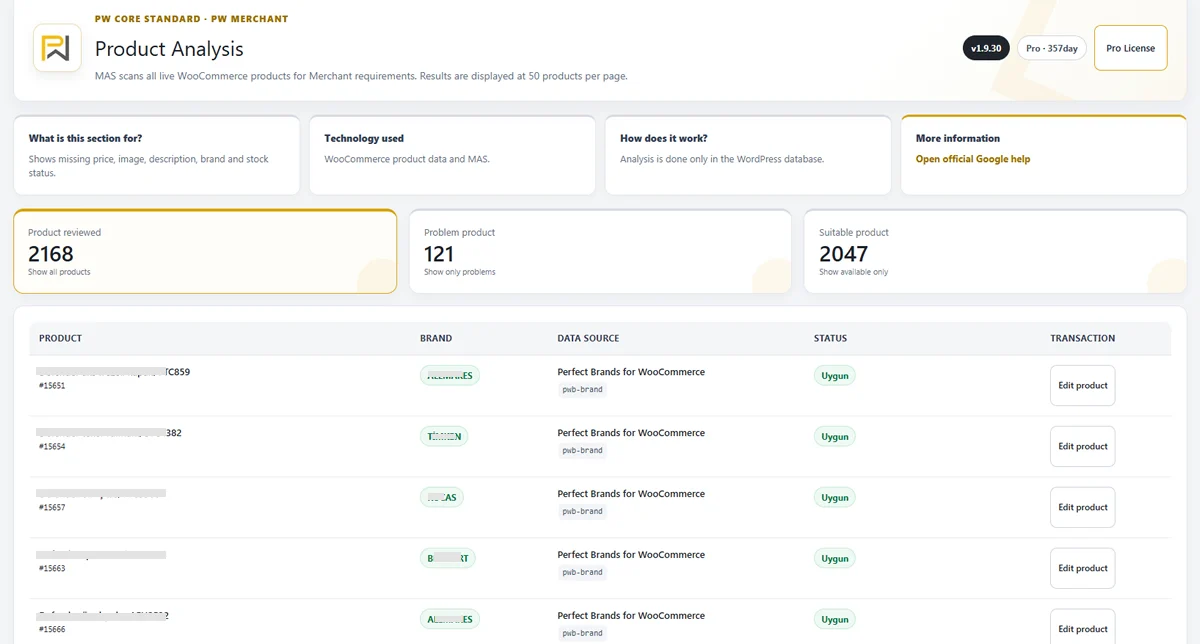
PW Merchant helps organise this review by separating suitable, problematic and critical products according to the available product information.
Correct detected issues directly in WooCommerce and repeat the product review before starting a large Merchant operation.

Setting up shipping information
Shipping information should reflect the conditions offered to real customers.
The selected countries, shipping costs, handling times and delivery estimates should be accurate.
Review the store’s actual operation before entering shipping settings.
Important areas include:
- Countries or regions served
- Shipping charges
- Free shipping thresholds
- Order cut-off times
- Handling time
- Estimated delivery time
- Carrier information where relevant
- Product groups with different shipping conditions
The information in Merchant Center should remain compatible with the shipping conditions displayed during WooCommerce checkout.
A customer should not see a significantly different shipping cost after reaching the store.
If different products have different shipping requirements, plan the structure carefully instead of using one inaccurate rule for the entire catalogue.
Publishing a clear shipping policy
In addition to account settings, the website should contain a clear shipping or delivery policy.
The policy should explain the actual service offered by the business.

It may include:
- Areas where orders are delivered
- Expected order preparation time
- Estimated delivery time
- Shipping costs
- Free shipping conditions
- Possible delays
- Order tracking information
- Conditions for damaged or missing deliveries
Avoid vague promises that the business cannot consistently meet.
The policy should be easy to find through the website footer, checkout area or customer service pages.
Setting up return and refund information
A return policy tells customers whether products can be returned and under which conditions.
Merchant Center may allow the account owner to create a standard return policy and, where necessary, separate exceptions for specific product groups.
Your return information should match the policy published on the website.
Review:
- The return period
- Eligible product conditions
- Products excluded from returns
- Return shipping responsibility
- Refund processing time
- Exchange conditions
- The return address or process
- How customers begin a return request
Do not publish one policy on the website and enter different conditions in Merchant Center.
Consistency reduces customer confusion and supports a more trustworthy store experience.
Contact and customer service information
Customers should be able to contact the business when they have questions about products, delivery, returns or payments.
A reliable contact section may include:
- Customer service email
- Telephone number
- Contact form
- Business address where appropriate
- Support hours
- Expected response time
Use working contact methods that are monitored regularly.
A contact page that contains only an inactive form or an unanswered address can reduce customer confidence.
Privacy policy and terms
The website should explain how customer information is handled.
A privacy policy should reflect the actual data processing practices of the store.
Depending on the business and target market, additional legal pages may also be required.
These may include:
- Terms and conditions
- Cookie policy
- Distance sales information
- Payment conditions
- Warranty information
- Cancellation policy
Legal requirements differ by country. The store owner should obtain appropriate professional advice where necessary.
PW Merchant does not create legal compliance automatically.
Selecting target countries and language
Product operations should be planned according to the actual countries and languages supported by the business.

Do not select countries where the store cannot deliver products or provide customer support.
Review:
- Store language
- Product language
- Target countries
- Supported currencies
- Shipping availability
- Return conditions
- Tax and legal requirements
Product pages, prices and customer policies should be understandable for the intended market.
If the store operates in multiple languages or currencies, each version should remain consistent and properly maintained.
Reviewing tax and price conditions
Prices shown on the website and used during Merchant operations should follow the conditions applicable to the target country.
Review whether the visible price includes or excludes tax and whether the store communicates this clearly.
The correct setup depends on the operating country, customer type and local regulations.
WooCommerce price configuration, checkout calculations and Merchant information should not contradict one another.
When using currency conversion, make sure the standard WooCommerce prices reflect the actual amounts customers pay.
Understanding Merchant Center data sources
A data source is the method used to provide product or related information to Merchant Center.
Merchant Center can contain different types of sources and input methods.
For product data, a store may use:
- Automatic website-based product discovery
- An e-commerce platform connection
- An XML, text or spreadsheet file
- Manual product entry
- An API-based product source
Before connecting PW Merchant, review the sources already present in the Merchant Center account.
Do not assume that the account is empty simply because a new plugin has not been connected before.
An older WordPress plugin, automatic website source or manually configured feed may already be providing the same products.
Avoiding conflicts with an old XML feed
When moving from an XML feed to PW Merchant, the existing source should be reviewed carefully.
Keeping an old feed and a new API source active for the same products may create duplicate or conflicting records if the transition is not planned correctly.
Before changing anything, document:
- The name of the current data source
- The products included in that source
- The identifiers used for those products
- The update schedule
- Whether the source is still active
- Whether another plugin controls the source
Do not immediately delete a working source before testing the new connection.
Begin with a limited and controlled PW Merchant test. Compare the products, identifiers and results. After confirming that the new workflow is working correctly, decide whether the older source should be paused, removed or limited to a different product group.
A safe migration does not begin by deleting the old source. It begins by understanding what the old source currently manages.
Preventing duplicate products
Duplicate products may occur when the same catalogue is supplied through more than one active source without a clear strategy.
They may also appear when product identifiers differ between systems.
To reduce this risk:
- Review every active Merchant Center data source
- Use consistent product identifiers
- Do not allow two sources to manage the same products unintentionally
- Test the API workflow with a small product group
- Compare existing and newly processed products
- Confirm which source should remain authoritative
- Disable the old source only after verification
Multiple data sources are not always incorrect. They may intentionally manage different catalogues, countries or types of information.
The important requirement is that each source has a clear responsibility.
Checking automatic product sources
Merchant Center may use automatic methods to discover or update products from an online store.
Review whether an automatic source is active before adding a separate API-based source.
If automatic product discovery and PW Merchant manage the same catalogue, the account should be reviewed for overlap.
Do not disable an automatic source without understanding its effect. However, do not leave overlapping sources active simply because they were created automatically.
The account should have a deliberate data-source strategy.
Preparing PW Merchant
After the Merchant Center account and website have been prepared, the PW Merchant setup can begin.
Before connecting, confirm that:
- WordPress and WooCommerce are functioning correctly
- The supported PHP requirements are met
- The authorised PW Merchant package is installed
- The licence is active for the correct domain
- The website uses the expected domain version
- Administrator access is available
- The Merchant Center account is accessible
- The website has been verified and claimed
- Existing data sources have been reviewed
- Products contain usable information
Use the original PW Merchant package and supported licence process.
Modified or unofficial plugin packages may create compatibility, update and security risks.
Connecting PW Merchant to Google
Follow the connection steps shown inside the PW Merchant administration interface.
The technical authentication process is managed through the supported connection structure.
Use the correct Google account and Merchant Center account during authorisation.
Before confirming the connection, check that you are not signed into an unrelated personal or client account in another browser tab.
After connection, return to PW Merchant and review the displayed connection status.
If the expected Merchant account is not shown, do not begin product operations until the account selection has been corrected.
Running the first product review
The first PW Merchant action should normally be a controlled catalogue review rather than an immediate full-catalogue operation.
The review helps show:
- The number of products examined
- Suitable products
- Problematic products
- Critical products
- Missing product information
- Fields requiring attention
Begin by examining the critical products.
Correct the affected information inside WooCommerce. Save the changes and review the products again.
Continue with problematic products before moving to a larger Merchant operation.
Testing with a limited product group
Do not begin a new integration by processing thousands of products at once.
Select a small and representative group.
The test group may contain:
- A simple product
- A variable product
- A product with a sale price
- A product with stock management
- A product with brand and identifier information
Review how these products are processed and how they appear in Merchant Center.
Check for duplicate records, price differences, stock mismatches, missing images and identifier problems.
Expand the operation only after the limited test produces the expected result.
Common setup mistakes
Many Merchant problems begin before the plugin connection.
Common mistakes include:
- Using an account that the business does not control
- Entering inconsistent business information
- Connecting an unfinished website
- Failing to verify and claim the website
- Publishing incomplete shipping information
- Using a return policy that differs from the website
- Submitting products without images
- Using incorrect prices or stock values
- Ignoring variable-product data
- Leaving an old XML feed active without review
- Processing the entire catalogue before testing
- Expecting the plugin to guarantee Google approval
A careful setup can prevent many repeated corrections later.
What PW Merchant does not replace
PW Merchant does not replace responsible store management.
The plugin does not automatically provide:
- A complete Merchant Center account
- Accurate business information
- Legal policies
- Correct shipping conditions
- Correct product prices
- Reliable stock management
- Google account approval
- Automatic product approval
- Guaranteed advertising performance
- Guaranteed sales
Google evaluates accounts, websites and products according to its own systems and policies.
PW Merchant helps the store owner review product data and manage supported operations more clearly. It cannot override external decisions or correct inaccurate business information automatically.
Final checklist before the first operation
Before starting the first larger PW Merchant operation, confirm the following:
- The correct Merchant Center account is connected
- The business information is accurate
- The website is verified and claimed
- HTTPS works correctly
- Product pages are accessible
- Prices match the website
- Stock information is current
- Shipping settings are complete
- The return policy is published and consistent
- Contact information is visible
- Existing data sources have been reviewed
- Old XML and new API sources do not conflict
- A limited product test has been completed
- Critical product issues have been corrected
- The server is suitable for the planned catalogue size
A complete Merchant setup is not a single connection step. It is the combination of an accurate business account, a trustworthy website, quality product data and a controlled product-source strategy.
What happens after setup?
After the account, website and PW Merchant connection have been prepared, product management becomes a repeatable process.
The recommended workflow is:
- Maintain accurate product information in WooCommerce
- Review the catalogue through PW Merchant
- Correct critical and problematic products
- Select the intended product group
- Start or schedule the relevant operation
- Monitor progress
- Review Merchant responses
- Repeat the review when prices, stock or products change
This structured approach helps store owners move from an incomplete or uncontrolled Merchant setup to a more professional management process.
PW Merchant supports this process by bringing catalogue review, issue classification, API-based operations and progress visibility into the WordPress administration environment.
Built from active e-commerce experience
PW Merchant is developed by a team that currently owns and operates three established e-commerce websites.
We work directly with products, stock updates, pricing, orders, payments, shipping, returns, advertising and customer communication.
This means we understand that a Merchant setup must function under real business conditions, not only in a technical demonstration.
We know the importance of accurate product information, reliable data sources, clear customer policies and controlled catalogue operations.
This practical experience shapes the PW Merchant setup process and helps us focus on the requirements that genuinely affect WooCommerce store owners.