
XML feed and API comparison
WooCommerce store owners can use different methods to provide product information to Google Merchant Center. Two of the most common approaches are file-based product feeds and API-based product management.

Both methods can support product data transfer, but they work in different ways and provide different levels of control.
An XML feed usually creates a structured file containing product information. Google Merchant Center accesses or receives this file according to the configured schedule.
An API-based system communicates through structured requests and responses. Product operations can be managed more directly, and individual products or selected groups can be processed according to the supported workflow.
PW Merchant is designed around an API-based approach because many WooCommerce store owners need more visibility, control and issue management than a basic file transfer process can provide.
This does not mean that XML feeds are always unsuitable. A feed-based method can remain useful for certain websites and business requirements.
The important question is not which method is universally better. The important question is which method provides the level of control, visibility and management required by the store.
What is an XML product feed?
An XML product feed is a structured file containing information about the products in an e-commerce catalogue.
The file may include product titles, descriptions, prices, stock status, images, links, identifiers and other relevant fields.
A WooCommerce plugin or external system normally generates the file. Google Merchant Center then accesses the feed through a scheduled source, uploaded file or another supported method.
The feed may be refreshed at specific intervals. When the file is regenerated, updated product information becomes available for the next scheduled retrieval or processing cycle.

A typical XML feed workflow may include the following stages:
- The store owner creates or updates products in WooCommerce.
- The feed plugin reads the relevant product information.
- A new XML file is generated.
- Google Merchant Center accesses or receives the file.
- The products in the file are processed.
- Warnings and errors are reviewed in Merchant Center.
This method can be straightforward for stores that need a basic catalogue export and do not require detailed product-level control inside WordPress.
What is API-based product management?
API-based product management uses structured communication between WooCommerce and the relevant external system.
Instead of depending only on a generated catalogue file, supported product operations can be initiated through direct requests.
The API returns status information, operation results or issue details according to the supported connection.
For the user, this creates the possibility of a more interactive management workflow.
The store owner may be able to review products, select a group, start an operation, monitor progress and see relevant responses through the plugin interface.
The user does not need to create technical API requests manually. PW Merchant manages the supported communication in the background.
A typical API-based workflow may include:
- Reviewing WooCommerce products before an operation
- Separating suitable and problematic products
- Selecting the intended product group
- Starting or scheduling an operation
- Monitoring processing progress
- Reviewing product-level results
- Correcting affected products in WooCommerce
- Repeating the relevant operation when necessary
This approach can create greater visibility and control for stores with more demanding product management requirements.
The main difference between a feed and an API
The main difference is the way product information is managed and transmitted.
An XML feed generally presents the catalogue as a file. The external platform processes the information contained in that file.
An API-based workflow supports direct communication for the relevant operation. Products may be managed individually or in controlled groups, depending on the system and plugin features.
A feed-based process is often catalogue-centred.
An API-based process can be more operation-centred and product-centred.
An XML feed represents the catalogue as a structured file, while an API-based workflow manages supported product operations through direct system communication.
This difference affects update behaviour, issue visibility, scheduling, monitoring and the amount of control available to the store owner.
Product update behaviour
In a feed-based system, updated product information normally becomes available when the feed file is regenerated and processed again.
The time required for the change to appear may depend on the feed generation schedule, Merchant retrieval schedule and external processing time.

For example, a price may be changed in WooCommerce. The XML file must then be updated. The new file must be accessed and processed before the revised information becomes part of the Merchant workflow.
In an API-based system, the relevant product operation can be initiated according to the supported workflow.
This may provide greater control over which products are processed and when the operation begins.
PW Merchant is designed to help users identify products affected by catalogue changes and manage suitable operations through a controlled process.
No method can guarantee that every external system will display a change immediately. Processing times, account status and external service conditions remain outside the direct control of the plugin.
Product-level control
Product-level control is an important difference between basic feed generation and a structured API workflow.
A traditional feed may contain the full catalogue or a filtered catalogue. When the file is processed, the products inside it become part of the same general operation.
An API-based management system can support more focused actions.
A user may want to manage:
- Newly added products
- Products from a specific category
- Products with corrected information
- Previously problematic products
- Seasonal products
- A limited test group
- Products with recent price or stock changes
PW Merchant is developed around this controlled management principle.

Instead of treating the catalogue only as one large data file, the plugin helps users review product condition and decide which products should continue through the next operation.
Issue visibility
Issue visibility is one of the most important areas in Merchant management.
With a basic feed workflow, store owners may generate and submit a file successfully but discover product problems later through Merchant Center.
The feed itself may exist and remain accessible even when individual products contain incomplete or unsuitable information.
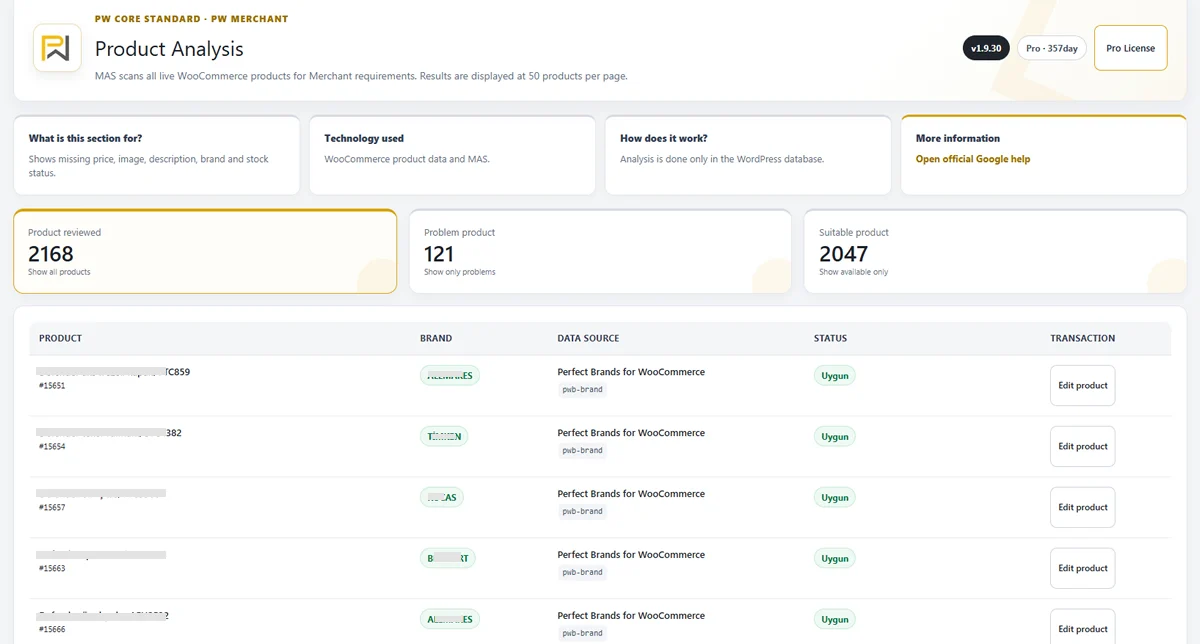
PW Merchant adds a product review stage before or around supported API operations.
This helps users identify possible problems inside the WordPress administration area.
The plugin can help classify products as suitable, problematic or critical according to the available product data and review conditions.
This allows store owners to begin correcting issues before processing a large group of products.
Possible issues may include:
- Missing product image
- Incomplete product description
- Unavailable price
- Incorrect stock information
- Missing brand detail
- Missing product identifier
- Incomplete variation information
- Invalid product page
This early visibility can reduce unnecessary repeated operations.

Error management and responses
Every product management method can encounter warnings, errors or interrupted processes.
The difference is how clearly these conditions can be associated with the affected product and operation.
A feed-based system may provide file-level and product-level reports through Merchant Center. The user may need to move between WooCommerce, the feed plugin and Merchant Center to understand the problem.
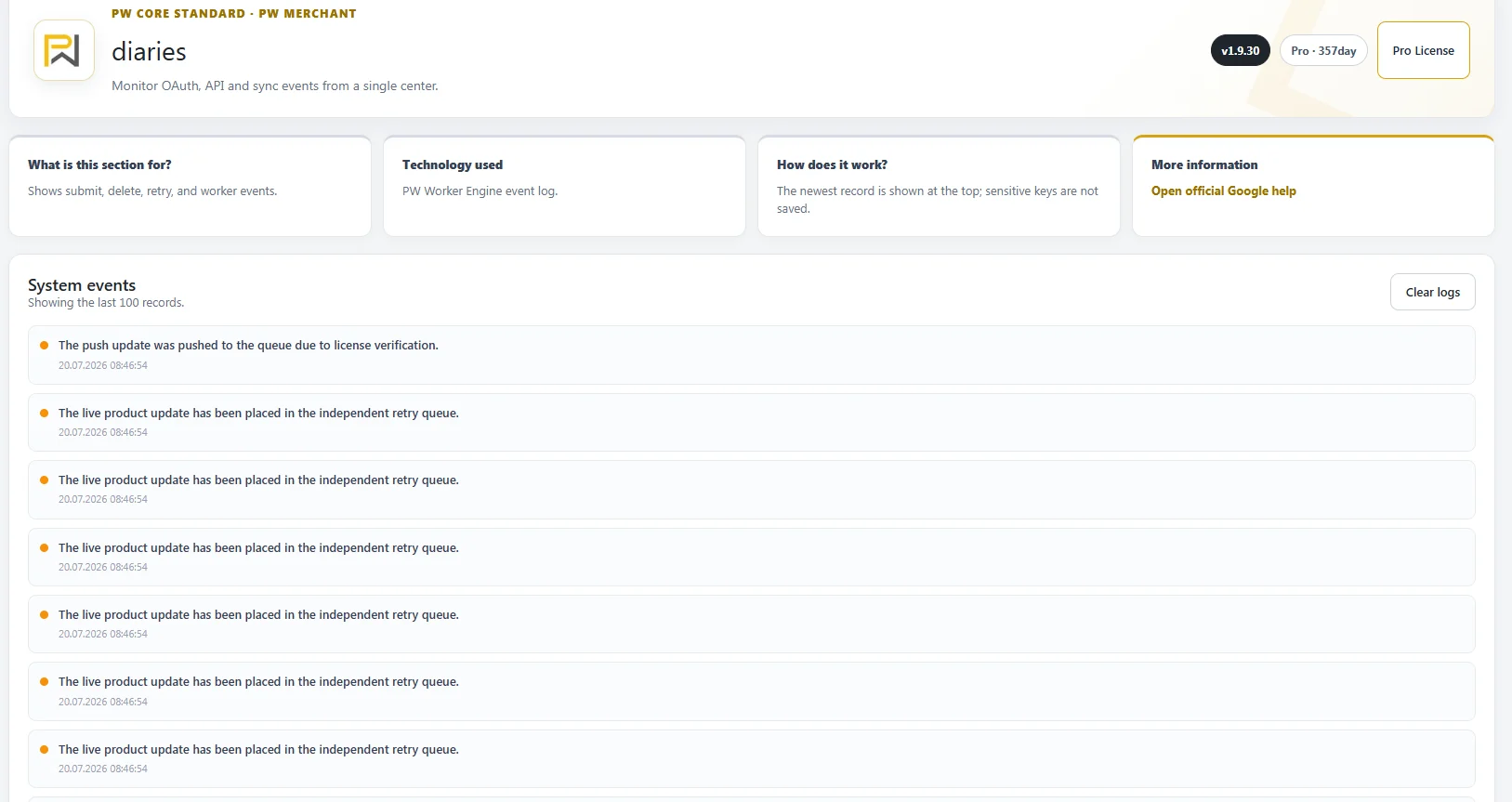
An API-based plugin can help bring relevant operation responses into the WordPress workflow.
Where available, PW Merchant aims to help the user understand:
- Which product was affected
- What type of issue occurred
- Whether the issue appears critical
- Which product field may need attention
- Whether the product should be reviewed again
- Whether the operation may need to be repeated
Some external errors remain dependent on Google Merchant Center account settings, policies and service conditions.
PW Merchant cannot control external decisions, but it can help present available information through a more organised interface.
Large catalogue management
A large WooCommerce catalogue requires careful processing.
Generating a single XML file can be a practical approach for some stores. However, very large or complex catalogues may also create feed generation, memory, timeout and refresh challenges.

API-based processing has different technical requirements.
Large product groups should not be handled through one uncontrolled request. Operations may need to be divided into smaller batches and managed through background tasks.
PW Merchant uses a planning-oriented and batch-conscious approach for demanding operations.
This can help users:
- Divide a large operation into manageable groups
- Schedule processing for quieter periods
- Monitor completed and remaining products
- Identify failed or interrupted items
- Repeat only the relevant work when possible
Neither XML nor API automatically removes hosting limitations.
The store still needs a reliable server, a healthy database and a properly maintained WordPress environment.
Scheduling differences
XML feeds are commonly regenerated and retrieved according to a schedule.
This can be convenient when the store wants the entire feed to update at regular intervals.
The schedule may be controlled by the feed plugin, WordPress cron, server cron or Merchant source settings.
API-based operations may provide a more flexible planning experience for selected products or specific tasks.

PW Merchant can support immediate and scheduled operation methods according to the relevant feature.
This is useful when a store owner wants to:
- Process a small corrected group immediately
- Schedule a large operation at night
- Delay processing until catalogue work is completed
- Manage seasonal products at a specific time
- Avoid demanding operations during peak traffic
Both approaches can use scheduling, but they schedule different types of work.
A feed schedule normally manages file generation or retrieval. An API schedule can manage the relevant product operation itself.
Monitoring and progress information
Progress visibility is especially important when the store has many products.
With an XML feed, the user may see whether the file was generated and whether Google processed it. Detailed product results may then need to be reviewed through the Merchant interface.
PW Merchant aims to provide more operation-oriented visibility inside WordPress.
Depending on the relevant process, the user may see:
- Products examined
- Suitable products
- Problematic products
- Critical products
- Products waiting for processing
- Completed products
- Successful operations
- Failed or interrupted operations
This information helps the user understand the condition of the current workflow without relying only on a completed file.
Manual work requirements
Both XML and API systems require accurate WooCommerce product information.
No transfer method can permanently correct poor catalogue data without the involvement of the store owner.
However, the amount and type of manual work may differ.
With a basic feed system, users may need to review feed settings, regenerate the file, inspect Merchant warnings and then search for the relevant WooCommerce product.
PW Merchant aims to centralise more of the review and issue-identification process inside WordPress.
The user can identify affected products, correct them in WooCommerce and return to the plugin workflow.
This can reduce random manual checking and make the correction process more focused.
PW Merchant does not remove the need for accurate product management; it helps users understand where manual attention is required.
Simple store requirements
An XML feed may remain suitable for a small store with a stable catalogue and basic product transfer requirements.
For example, a store with a limited number of products, infrequent price changes and no need for detailed product-level operations may find a scheduled feed practical.
A file-based approach can also be easier when the store already has a reliable and well-maintained feed process.
Changing a working system without a clear reason may create unnecessary complexity.

PW Merchant is more relevant when the user needs greater visibility and control.
This can include stores that:
- Manage large catalogues
- Update prices frequently
- Experience regular stock changes
- Work with many product variations
- Need pre-operation product checks
- Want suitable, problematic and critical classifications
- Need clearer issue tracking
- Want scheduled product-level operations
Using XML and API sources together
Using multiple data sources requires careful planning.
If the same products are provided through an XML feed and an API connection without a clear source strategy, duplicate or conflicting product records may occur.
A store owner should understand which data source is responsible for each product group.
Before activating a new API workflow, existing Merchant data sources should be reviewed.
Important questions include:
- Is an older XML feed still active?
- Does the feed contain the same products?
- Are product identifiers consistent across both sources?
- Will both sources continue updating the same catalogue?
- Which source should remain authoritative?
- Should the old source be paused or removed after testing?
Multiple sources are not automatically wrong. They can be used intentionally for different product groups or business requirements.
The problem begins when the same products are managed by multiple sources without a clear plan.
Avoiding duplicate product records
Duplicate products can create confusion in Google Merchant Center.
They may occur when an older feed remains active after an API connection is introduced.
They may also occur when product identifiers, source rules or catalogue filters are inconsistent.
Before moving to PW Merchant, the store owner should document the existing product source setup.
A controlled transition may include:
- Reviewing all existing data sources
- Identifying which source contains the current catalogue
- Testing the API workflow with a limited product group
- Comparing product identifiers and results
- Preventing both sources from managing the same products unintentionally
- Disabling or removing the old source only after verification
Deleting an existing source without checking its purpose may remove products that are still needed.
Keeping both sources active without planning may create duplicates.
The transition should therefore be deliberate and tested.
Data source responsibility
Every Merchant workflow should have a clear product data source strategy.
WooCommerce should remain the primary source of product information for the website.
The selected Merchant method should then manage how that information is provided to Google Merchant Center.
In a feed-based workflow, the feed file represents the exported catalogue.
In the PW Merchant workflow, WooCommerce product data is reviewed and managed through supported API operations.
Maintaining clear responsibility helps prevent conflicting prices, stock states and product identifiers.
Storefront consistency
Regardless of whether a store uses XML or an API, the product information submitted to Merchant should remain consistent with the WooCommerce product page.
The customer should see the same relevant price, availability and product details that are used in the Merchant workflow.
Inconsistency can result from:
- Outdated feed files
- Delayed stock updates
- Custom price displays
- Variation data errors
- Cache problems
- Currency conversion issues
- Multiple active data sources
PW Merchant helps users review the source WooCommerce data and detect possible issues before or during supported operations.
The plugin cannot maintain consistency when other systems change prices or stock without updating WooCommerce correctly.
API management does not remove Google requirements
An API connection does not bypass Google Merchant Center requirements or policies.
Products must still contain accurate information. The website must remain accessible. Business, shipping and return details must be maintained correctly.
Google may continue to review products and accounts according to its own systems.
PW Merchant does not guarantee product approval or advertising results.
The value of the API workflow is greater management visibility and control, not the removal of external requirements.
Security and authorised access
An API-based system requires secure connection management.
Users should not need to expose technical credentials unnecessarily or use modified software packages from unknown sources.
PW Merchant is distributed through an authorised licensing and update structure.
This helps users access:
- Original plugin packages
- Domain-based licence verification
- Controlled software updates
- Supported product versions
- Continued assistance
The underlying technical infrastructure operates in the background.
The customer receives the practical benefits of authorised access without needing to manage the internal security architecture.
Performance considerations
Both XML and API systems use server resources.
An XML feed may require significant memory and processing power when generating a large file.
An API system may require multiple background requests and database operations when processing a large catalogue.
The better method depends partly on the website environment.
Important performance factors include:
- Catalogue size
- Number of product variations
- Database health
- Hosting resources
- WordPress cron reliability
- Other active plugins
- External service response time
- Traffic during processing
PW Merchant is designed with batch processing, planning and controlled workload principles.
However, no plugin can completely overcome an unsuitable server configuration.
Which method is easier to understand?
A basic XML feed can be easier to understand at the beginning.
The user creates a file, provides the file to Merchant Center and waits for processing.
However, managing errors, duplicate products, update timing and large catalogues may become more complex over time.
An API-based workflow may require a more structured initial setup.
Once connected, it can provide more product-level visibility and operational control.
PW Merchant is developed to make this structured workflow understandable through guided WordPress screens.
The technical complexity remains behind the interface, while the store owner focuses on products, issues and results.
Which approach is suitable for your store?
An XML feed may be appropriate when:
- The catalogue is small or stable
- Product changes are infrequent
- A working feed system already exists
- File-level scheduling is sufficient
- Detailed product-level control is not required
An API-based PW Merchant workflow may be more appropriate when:
- The catalogue is large or frequently changing
- Prices and stock levels change regularly
- Products need review before processing
- Suitable, problematic and critical classifications are useful
- The user needs clearer progress information
- Product groups should be processed separately
- Operations should be scheduled more carefully
- The store needs a guided Merchant management experience
The final decision should be based on real operational needs rather than the name of the technology.
Developed from real e-commerce operations
PW Merchant is developed by a team that actively owns and operates three established e-commerce websites.
This means our evaluation of XML and API workflows is not based only on technical documentation.
We work with real product catalogues, stock changes, price updates, customers, payments, shipping, returns and advertising processes.
We understand that the best system is not necessarily the one with the most technical features.
It is the system that provides reliable, understandable and manageable daily operations.
PW Merchant was developed for store owners who need more than product transfer: they need catalogue visibility, issue control and a repeatable management workflow.
A controlled transition from XML to API
Moving from a feed to an API workflow should be planned carefully.
A recommended transition process may include:
- Review the current Merchant data sources
- Identify the products managed by each source
- Check product identifiers
- Install and connect PW Merchant
- Review the WooCommerce catalogue
- Test a limited product group
- Compare the Merchant results
- Resolve duplicate or conflicting source conditions
- Expand the API workflow gradually
- Disable the old source only when the new process is verified
This approach reduces risk and provides time to understand the new workflow.
The PW Merchant approach
PW Merchant does not describe XML feeds as an incorrect technology.
File-based feeds can remain useful for suitable stores and established processes.
PW Merchant offers a different management model.
It is designed for WooCommerce store owners who want to review product quality, classify catalogue issues, manage product groups, schedule operations and monitor relevant results through an API-based workflow.
The main advantages of this approach include:
- Greater product-level visibility
- Pre-operation catalogue review
- Suitable, problematic and critical product classification
- Controlled group management
- Scheduled operations
- Progress and result monitoring
- Clearer issue identification
- Reduced dependence on one large catalogue file
- A more guided WordPress management experience
The purpose is not simply to replace one transfer format with another.
The purpose is to create a more organised, understandable and sustainable Merchant management process for WooCommerce businesses.