
Google Merchant Center Misrepresentation Issue: Causes, Checks and Resolution Steps
A Google Merchant Center misrepresentation issue can be one of the most difficult notices for an e-commerce business to understand. The message may affect product visibility or account eligibility, yet it may not identify one simple field that can be corrected in a few minutes. The underlying concern can relate to the way a business, product, offer or customer process is represented across the website, product data and Merchant Center account.
The correct response is not to change random sentences or request repeated reviews. A merchant should examine the entire customer journey and confirm that the website accurately represents the real business. Business identity, contact information, policies, prices, stock, delivery commitments, return procedures, checkout and product data should tell one consistent story.
PW Merchant Check is a free WordPress and WooCommerce preparation plugin that helps organize this audit. It can detect common local risks and ask the merchant structured questions, but it cannot see Google’s internal reason, access a Merchant Center account or guarantee reinstatement. Google remains the final decision-maker.
What misrepresentation means in Merchant Center
Google’s official Merchant Center misrepresentation policy prohibits false, unclear or misleading presentations of identity, affiliation, qualifications, products and offers. The policy includes presenting false business or contact information, offering products that the merchant cannot deliver, implying an affiliation or endorsement that does not exist and attracting customers under false or unclear conditions.
Misrepresentation is broader than a spelling mistake in a product feed. A website may contain technically valid product data while still creating uncertainty about who operates the store, how customers can obtain support or whether the advertised offer can actually be fulfilled. A genuine business can also receive a policy notice when its information is incomplete, inconsistent or difficult to verify.
For this reason, merchants should avoid searching for one universal “suspension fix.” Every e-commerce site has a different combination of business records, website content, payment arrangements, product sources, target countries and customer processes. The solution must reflect the real operation of that specific business.
Misrepresentation is not only a website design problem
A professional visual design can improve customer confidence, but appearance alone does not prove transparency. A modern theme may still contain placeholder text, copied policy content, an incomplete address, incorrect stock information or a checkout that fails for ordinary customers. Conversely, a simple store can be transparent when it clearly presents accurate information and provides a reliable purchasing process.
A complete review should consider at least four connected layers:
- The real legal and operational business.
- The information visible on the e-commerce website.
- The product data submitted to Merchant Center.
- The business, shipping and return settings configured in Merchant Center.
If these layers disagree, the merchant should identify the authoritative real-world information and correct every affected location. Editing only the website footer while leaving a different Merchant Center address or payment identity does not create genuine consistency.
Business identity and contact information
Customers should be able to understand who operates the store and how to obtain support. The business name, address, phone number and email shown on the website should be genuine and should match the information that the merchant is entitled to use.
In WooCommerce, the store address is normally configured in the general settings. The same address may also appear on the contact page, footer, invoices, terms, privacy policy, return policy and shipping page. Merchant Center contains its own business information. The merchant must compare these locations manually.
Differences are not limited to completely different addresses. A missing district, incorrect postal code, old trade name, unrelated support email or city written differently across systems can deserve investigation. The objective is not mechanical duplication for its own sake. The objective is to present one accurate business identity.
For a Türkiye-based e-commerce site, review the legal or trading name that the business genuinely uses, neighbourhood, street, building information, district, province, postal code, country, phone number and customer-support email. A business operating in İstanbul, Ankara, İzmir, Bursa, Antalya, Konya, Adana, Gaziantep or another city should not add unrelated city names merely for search visibility. GEO signals must reflect real service areas and genuine operations.
Contact-page checks
A contact form alone may not explain who operates the store. Customers may need a direct email address, phone number, physical or registered business address and information about when support is available. The details should be readable on desktop and mobile devices and should not be hidden behind a broken widget.
Open the contact page in a private browser window and ask:
- Is the business name visible?
- Is the address complete and current?
- Can a customer copy the email address?
- Does the phone link use the correct number?
- Does the contact form submit successfully?
- Is the information still accessible during checkout?
- Does the footer link to the contact page?
PW Merchant Check compares common WooCommerce address components with ordinary text on a published contact page and looks for email and phone signals. Page builders, maps, images and scripts can prevent detection, so an automatic result must always be confirmed visually.
Shipping and delivery transparency
A shopper should understand where the store delivers, how shipping charges are calculated and when an order is expected to arrive. General statements such as “fast delivery” may not be enough when the actual process includes handling time, carrier collection and different regional delivery estimates.
A useful shipping and delivery page normally explains:
- Available destination countries or regions.
- Order handling time.
- Estimated delivery time.
- Shipping methods and carriers where appropriate.
- Shipping charges or the method used to calculate them.
- Free-shipping conditions.
- Possible restrictions or remote-area conditions.
- How customers can ask about a delayed order.
The information shown on the website should match Merchant Center shipping settings and the real delivery process. If Merchant Center promises free delivery while the checkout adds a fee, or the website promises two-day delivery when ordinary orders take much longer, the merchant should correct the inaccurate promise.
Return and refund consistency
A return policy should represent what the business actually does after a customer requests a return. It should not be copied from an unrelated store or written only to satisfy a checklist. The return window, accepted product conditions, return method, shipping responsibility, refund outcome and contact process should be understandable.
Google’s current Merchant Center documentation states that return information submitted at product or account level should match the return policy indicated on the website. If a merchant changes its real process, both the website and relevant Merchant Center configuration should be reviewed.

PW Merchant Check looks for common topics such as return period, conditions, refund process and contact method. It does not provide legal advice. Requirements vary according to product, transaction, business model and applicable consumer law. A qualified professional should review legal policy text when necessary.
Terms, privacy and payment information
Terms and privacy pages should be published, accessible and specific to the real store. A privacy policy should describe genuine data handling rather than mention services the website does not use. Terms should not contain another business name, template placeholders or contradictory addresses.
Payment information should accurately describe available methods and the point at which payment is collected. Checkout should use secure HTTPS, display the correct currency and allow an ordinary eligible customer to complete an order. A payment logo should not be shown if that method is not actually available.
Review every policy page for old domain names, copied company information, unfinished brackets, example text and inconsistent email addresses. Search the WordPress database and page-builder templates when a former business name has been used.
Product price and availability
Product landing pages and submitted product data should agree on price, currency and availability. The offer visible after a shopper opens the product should correspond to the offer represented in Merchant Center. Variations need particular attention because different sizes, colours or configurations may have different prices and stock states.
Check the following:
- The main product price is present.
- The currency matches the target market and feed.
- Sale prices have genuine start and end conditions where used.
- The selected variation corresponds to the submitted variation.
- In-stock products can actually be purchased.
- Out-of-stock products are not represented as available.
- Checkout does not introduce an unexplained price change.
- Required taxes and charges are presented appropriately.
PW Merchant Check identifies published WooCommerce products without a price and products that WooCommerce does not consider purchasable. It does not compare directly against Merchant Center because it has no API connection. The merchant must use Google’s own diagnostics for that comparison.
Product identity, images and descriptions
A product should be represented clearly enough for a shopper and platform to understand what is being sold. Titles, descriptions, images, categories, brands and identifiers should refer to the real product. Merchants should not imply official brand affiliation, certification or reseller status unless it is genuine and permitted.

Common product preparation issues include:
- Missing featured images.
- Generic or copied descriptions.
- Titles containing unrelated promotional phrases.
- Missing SKU or product identifiers.
- Incorrect brand values.
- Empty variable products.
- Images showing a different product or variant.
- Products published before they are ready for sale.
The free PW Merchant Check product audit scans published WooCommerce products in controlled groups of 100. It reports these preparation signals without editing the catalogue.
Checkout must work for real customers
A merchant should test the entire purchasing process as a logged-out customer. Add an in-stock product to the cart, select a legitimate destination, review shipping, proceed through checkout and confirm that the available payment process can be completed in the ordinary way.
Look for broken buttons, missing fields, impossible shipping destinations, unexpected mandatory account creation, JavaScript errors, expired payment configuration and pages that redirect to another business. Test desktop and mobile layouts. If different countries are targeted, test the customer journey for each supported country.
PW Merchant Check confirms whether assigned WooCommerce cart and checkout pages are published, but it does not place a real order. A human checkout test remains necessary.
Technical accessibility and indexing
Google and customers need to reach public pages. Review HTTPS, search-engine visibility, noindex directives, permanent links, canonical addresses, maintenance mode, password protection, redirects and server errors.
A development website may discourage search engines during construction. That setting should be reviewed before Merchant Center preparation. Product and policy pages should return successful responses and should not require a login. Important content should remain visible without depending entirely on interactions that an automated system may not reproduce.
PW Merchant Check can inspect local WordPress visibility settings and perform a protected public-homepage check when an authorized administrator requests it. The public check can detect HTTPS, response status, title, homepage noindex, common contact or policy links, canonical signals and common structured-business data.
Placeholder and copied content
Unfinished templates can undermine an otherwise genuine store. Search for “lorem ipsum,” example addresses, sample phone numbers, demo products, theme-brand names, unused social links and placeholder policy text. Review headers, footers, mobile menus, account pages, emails and checkout templates.
Copied content can also create contradictions. A return policy copied from another country may mention a different currency, law, warehouse, carrier or business name. Replace it with accurate information that reflects the real operation.

Do not create another account to escape the issue
Opening another Merchant Center account for the same unresolved business is not a responsible shortcut. It can create additional consistency and policy-circumvention concerns. Work on the original issue, understand the current account status and follow the options provided in Merchant Center.
If the business genuinely operates multiple brands, websites or legal entities, the correct account structure should be determined from official guidance rather than improvised after a suspension. Keep clear records showing which entity operates each store and offer.
A practical resolution workflow
Use the following sequence to organize the work:
- Read the exact notice in Merchant Center and the related official policy.
- Do not assume that one visible warning is the only issue.
- Record the real business name, address, phone, email and customer-support process.
- Compare those values with WooCommerce, the website, Merchant Center and payment records.
- Review contact, about, privacy, terms, shipping, delivery, return and refund pages.
- Test products, price, currency, stock, variation selection and checkout.
- Remove placeholder, copied or contradictory content.
- Review public indexing, HTTPS, canonical and structured data.
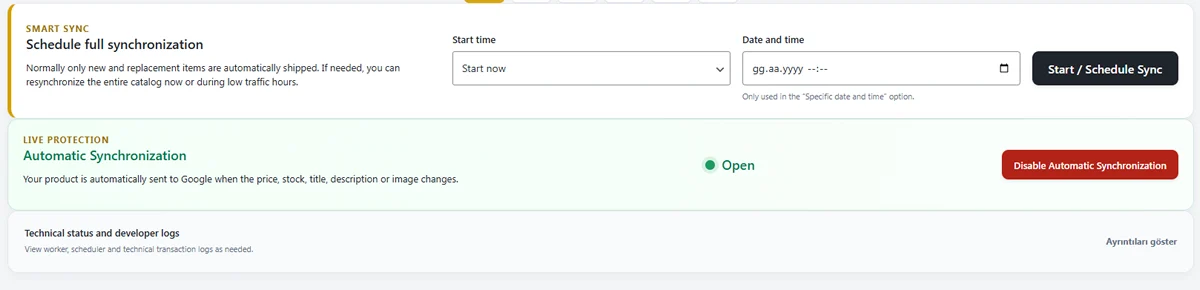
- Update product data and allow normal synchronization to complete.
- Document every substantive correction.
- Request a review only through the option available in Merchant Center after the issue is genuinely corrected.
Google’s official policy guidance for certain account and product issues instructs merchants to update the website and product data before requesting a review or appeal. Review availability and timing can depend on the issue. Always follow the current instructions displayed in the account.
How PW Merchant Check supports the workflow
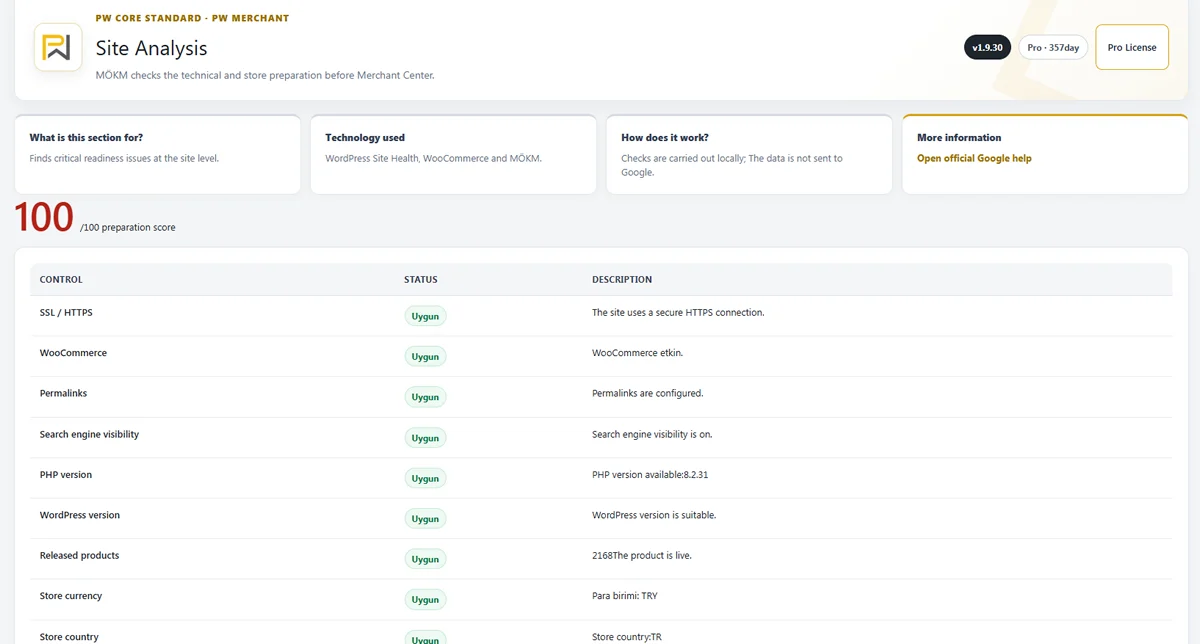
PW Merchant Check provides a repeatable preparation process inside WordPress. The site audit prioritizes critical and important findings. The product audit identifies common WooCommerce catalogue gaps. The misrepresentation review asks the merchant to confirm real operational conditions. The report stores a limited score history and can be downloaded as HTML.
The local readiness score should be treated as an action-organizing tool. It cannot measure external reputation, verify legal documents, access payment-provider records, inspect the physical business, read Merchant Center diagnostics or predict Google’s decision.
Use the plugin to discover questions that need answers. Do not change accurate information merely to raise the score. If the plugin cannot detect an address created by a page builder, confirm it visually rather than duplicating the address unnaturally.
Common mistakes during correction
- Requesting a review before testing checkout.
- Changing only the contact page while Merchant Center remains different.
- Publishing generic policies that do not match real operations.
- Creating another account instead of resolving the original issue.
- Removing accurate product data only to improve an audit score.
- Ignoring mobile navigation and footer links.
- Assuming HTTPS alone proves trustworthiness.
- Using false badges, reviews, affiliations or guarantees.
- Allowing out-of-stock products to remain purchasable.
- Submitting an appeal without documenting substantive corrections.
Frequently asked questions
Can one missing policy page cause a misrepresentation issue?

A missing page can be an important readiness problem, but an external observer cannot confirm that it is the sole reason for a specific account decision. Review the complete business, website, product and account presentation.
Will adding an address guarantee approval?
No. The address must be genuine, accurate and consistent, and the rest of the store must also meet applicable requirements. Adding text only to obtain approval is not a substitute for a real business identity.
Can PW Merchant Check see the exact Google suspension reason?
No. The free plugin has no Merchant Center API connection. It checks local and public preparation signals only.
Does a 100/100 preparation score mean the account will be approved?
No. The score is an experience-based local readiness indicator, not a Google approval score or guarantee.
Should I request another review immediately after editing one page?
Review the entire store first. Follow the current instructions in Merchant Center and request a review only after substantive corrections are complete and synchronized.
Should I delete my Merchant Center account and start again?
Do not treat account deletion or duplication as a standard fix. Resolve the original policy issue and use the official options provided for the affected account.

Why does the plugin report an address mismatch when the address is visible?
The address may be produced by a widget, image, map, script or page-builder field that is not ordinary page text. Use the result as a prompt for manual verification.
Can the plugin write my legal policies?
No. It can identify missing pages and common topics, but it does not create legal text or determine compliance with consumer law.
What should I do with products that are not actually available?
Make the website and submitted product availability accurately reflect reality. Do not represent an unavailable product as ready for purchase or delivery.
Does the plugin send suspension information to Poyraz Web?
No. PW Merchant Check does not access suspension data and does not send local audit results to Poyraz Web or PW Feed.
Can an agency use the report for a client?
Yes, with authorization. The agency should explain that the report is a preparation review and should never promise Merchant Center approval.
Official resources
Read Google’s official Merchant Center misrepresentation policy, Merchant Center guidelines and product data specification. Account interfaces and review procedures can change, so current official instructions should take priority over third-party articles.
Final assessment

A misrepresentation issue should be approached as a complete transparency and consistency audit, not a quick technical patch. Confirm that the real business can provide the products it offers. Make identity and contact information clear. Publish genuine policies. Match website, product data and Merchant Center settings. Test checkout as a customer. Remove unfinished or misleading content.
PW Merchant Check can make this work more structured for WooCommerce merchants in Türkiye and other markets. It helps identify visible risks, prioritize corrections and document progress without requiring a Google API connection. The final responsibility remains with the merchant, and the final policy decision remains with Google.