
PW Merchant features
PW Merchant brings together the main tools WooCommerce store owners need to review product data, organise catalogue quality and manage Google Merchant Center operations through a more controlled workflow.

The plugin is designed to make Merchant management easier to understand without removing the flexibility required by experienced users. Instead of presenting store owners with a single product transfer button, PW Merchant creates a structured environment where products can be reviewed, classified, corrected, processed and monitored.
Each feature is developed around a practical business need. The goal is not to add unnecessary complexity. The goal is to help WooCommerce users understand what is happening in their catalogue and decide what action should be taken next.
PW Merchant combines product analysis, API-based management, scheduled operations, issue visibility, licence verification and guided administration in a single WooCommerce solution.
WooCommerce product catalogue review
PW Merchant reviews relevant product information stored in WooCommerce and helps users evaluate whether products appear ready for Merchant-related operations.
The product catalogue remains inside WooCommerce. Store owners continue to manage product titles, descriptions, prices, stock information, images, variations and other details through the standard WooCommerce product editing screens.
PW Merchant uses this existing information to create a Merchant-oriented overview.
This can help users identify products that contain missing, incomplete or inconsistent information before beginning larger product operations.
The review process may consider several areas, depending on the product structure and available data:
- Product title
- Product description
- Regular and sale price information
- Stock status and availability
- Main product image
- Product page link
- Brand information
- Product identifiers
- Category information
- Variation data
- Product visibility
- Other Merchant-related fields
This centralised review can reduce the time required to inspect large WooCommerce catalogues manually.
Suitable, problematic and critical product classification
PW Merchant helps organise reviewed products according to their general condition.
A long product list becomes difficult to manage when every product is presented in the same way. A store owner needs to know which products appear ready, which ones require attention and which ones contain issues that should be resolved first.
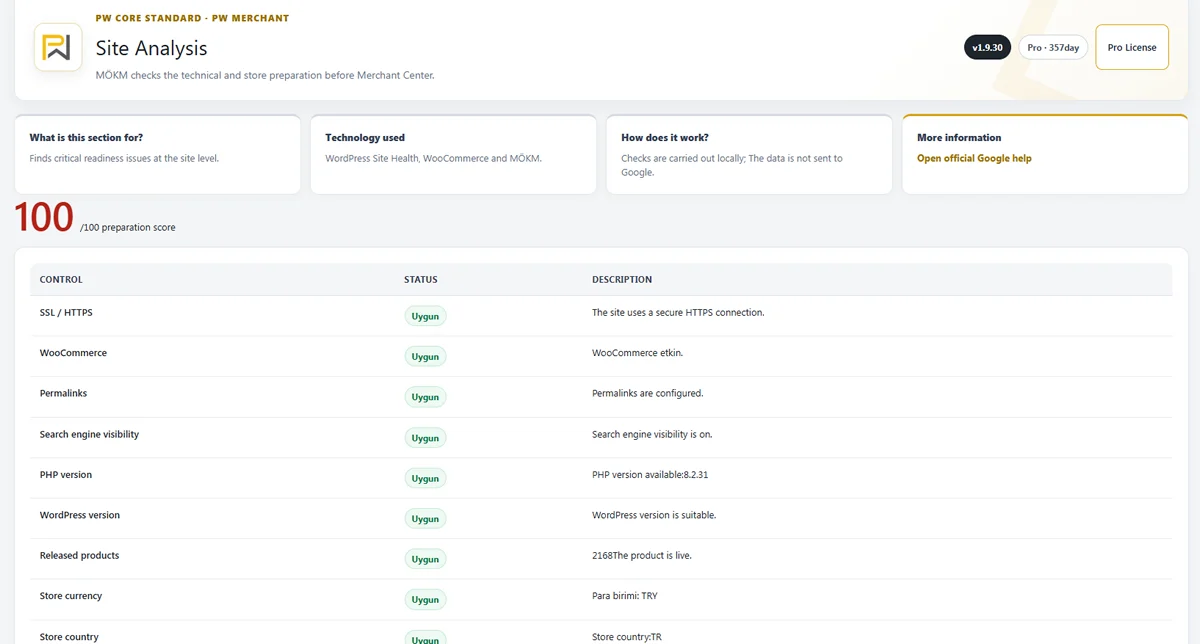
PW Merchant addresses this need through product classification.
Suitable products may contain the essential information expected for the intended operation.
Problematic products may contain incomplete or inconsistent data that should be reviewed.
Critical products may contain a more serious issue that can prevent meaningful processing or require immediate correction.
This classification creates a clear order of priority.
Store owners can begin with critical products, continue with problematic products and then manage suitable products through the next supported Merchant operation.
PW Merchant helps users focus on the products that need attention instead of reviewing the entire catalogue without a clear priority.
The classification system is an internal management tool. It does not replace the evaluations, account reviews or policy decisions made by Google Merchant Center.
Product data quality control
Product data quality directly affects the organisation and reliability of a Merchant workflow.
Incomplete or inconsistent product information can create warnings, unsuccessful operations and repeated manual corrections.
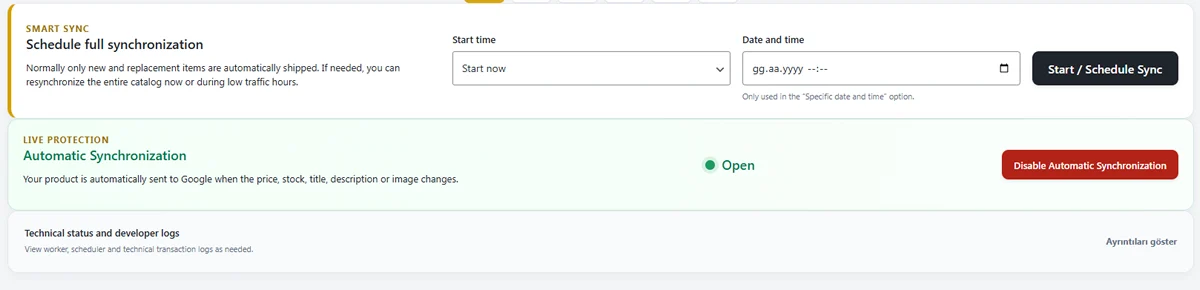
PW Merchant helps make product data quality more visible through the WordPress administration area.
Store owners can use this visibility to check important areas before or after supported Merchant operations.
Common product data problems may include:
- A missing product image
- An incomplete description
- An unavailable or incorrect price
- Outdated stock information
- An inaccessible product page
- Missing brand information
- Missing product identifiers
- Incomplete variation details
- Inconsistent product fields
- Products that are not publicly available
PW Merchant does not automatically create accurate product information where it does not exist. The store owner remains responsible for maintaining the WooCommerce catalogue.
The plugin helps identify where improvements may be required and makes the correction process more organised.
API-based Google Merchant Center connection
PW Merchant is designed around an API-based connection with Google Merchant Center.
An API-based workflow allows supported product operations to be managed through structured communication between systems.
The user does not need to create technical requests or manually manage the API communication.
The technical connection operates in the background while the user works through the plugin interface inside WordPress.
This approach can provide several practical benefits:

- More controlled product operations
- Better visibility over processing results
- Product-level or group-level management
- Clearer issue tracking
- More organised scheduling
- A stronger foundation for future improvements
PW Merchant is intended to make the advantages of API-based management available to WooCommerce store owners without requiring software development knowledge.
Controlled product operations
Not every WooCommerce product needs to be handled through the same operation at the same time.
A store may contain new products, discontinued products, seasonal products, corrected products and products that are not intended for a particular Merchant workflow.
PW Merchant supports a more controlled approach.
Users can review the catalogue and focus on the products that are relevant to the next operation.
This may be useful when:
- Testing the workflow with a small product group
- Managing products from a specific category
- Processing newly added products
- Reviewing previously problematic products
- Prioritising seasonal products
- Reducing pressure on the server
- Separating suitable products from products requiring correction
This structure helps users avoid unnecessary catalogue-wide operations and creates a more professional working method.
Bulk product management
WooCommerce stores with large catalogues cannot manage every product one by one.
PW Merchant includes a bulk-oriented workflow for supported product operations.

Bulk management helps store owners work with groups of products instead of repeating the same action for each individual item.
This can provide significant time savings for catalogues containing hundreds or thousands of products.
Bulk processing must still be controlled carefully.
Attempting to process an entire large catalogue in a single uncontrolled request may create server timeouts, memory problems or interrupted tasks.
For this reason, PW Merchant is designed to use a more manageable process for demanding operations.
Large tasks can be divided into smaller groups, scheduled for suitable times and followed through the administration interface.
Background and batch processing
Long-running operations should not depend completely on the user keeping a browser page open.
PW Merchant supports background and batch-oriented processing for suitable tasks.
Batch processing divides a large catalogue operation into smaller and more manageable groups.
This can help improve stability, reduce the effect of PHP execution limits and make progress easier to follow.

Background processing can also allow the user to continue working in WordPress while a supported operation continues.
The actual processing speed depends on several external conditions:
- The number of products
- The number and complexity of variations
- Server processor and memory resources
- Database performance
- External API response time
- Other active plugins
- Scheduled tasks running on the website
- Hosting limitations
PW Merchant aims to manage these conditions responsibly, but the plugin cannot completely remove the technical limitations of an unsuitable hosting environment.
Scheduled Merchant operations
Store owners may not always want to start a large product operation immediately.
A busy WooCommerce website may receive significant traffic during business hours. Running demanding operations during these periods may not be ideal.
PW Merchant supports a planning-oriented workflow for relevant operations.
Depending on the available feature and configuration, users may be able to start a task immediately or schedule it for a later time.
This can help store owners:
- Run demanding processes during quieter periods
- Use server resources more carefully
- Prepare a product group in advance
- Plan catalogue operations around business hours
- Review results after the scheduled task
- Reduce interruptions during daily store management
Scheduled operations are especially valuable for large catalogues, frequently updated stores and agencies managing multiple e-commerce projects.
Product progress counters
Users need clear information during a catalogue review or Merchant operation.
PW Merchant provides progress-oriented information to help users understand the general condition of an operation.

Depending on the active process, users may be able to see figures such as:
- Total products examined
- Suitable products
- Problematic products
- Critical products
- Completed operations
- Successful product operations
- Failed or interrupted operations
- Products waiting for processing
These counters give users an overview without requiring them to examine every product individually.
They also help store owners decide whether the next step should be correction, processing, monitoring or another catalogue review.
Clear issue and error visibility
External systems may return warnings, errors or status messages during product operations.
Technical responses are not always easy for store owners to understand.
PW Merchant aims to present available information in a clearer and more practical form.
When possible, the interface helps the user understand:
- Which product was affected
- What type of issue occurred
- Whether the issue appears critical
- Which product field should be checked
- Whether the product may need another review
- Whether the operation should be repeated
Some responses depend on Google account settings, policy reviews or external systems that operate outside WordPress. These conditions cannot always be corrected directly by a plugin.
However, better issue visibility can reduce confusion and prevent users from repeating unsuccessful actions without understanding the cause.
Product image checks
Product images are an important part of both the WooCommerce customer experience and Merchant product presentation.
A product without a suitable image may create an incomplete listing or prevent the product from being handled as expected.

PW Merchant helps make missing or potentially unsuitable image conditions more visible during product review.
Store owners can then update the relevant WooCommerce product with a clearer and more appropriate image.
Product image quality remains the responsibility of the store owner.
The plugin cannot guarantee that every image will be accepted, because external platforms may evaluate image quality, content, accessibility and policy compliance according to their own requirements.
PW Merchant provides an early visibility tool that helps users find obvious image-related problems more easily.
Price and stock visibility
Price and stock information can change frequently in a WooCommerce store.
A product may be placed on sale, returned to its regular price, marked out of stock or updated after a supplier change.
These changes affect the information used during Merchant operations.
PW Merchant helps store owners review the available price and stock data and notice possible inconsistencies.
The standard WooCommerce price and stock fields remain the primary source of information.

When a problem is detected, the correction should normally be made in the WooCommerce product settings.
This helps keep the product page and Merchant-related data aligned.
A reliable Merchant workflow begins with accurate product information inside WooCommerce.
Variable product support
Variable products are more complex than simple products.
A single WooCommerce product may include several variations with different colours, sizes, prices, stock levels, images or identifiers.
PW Merchant is developed with the requirements of variable product structures in mind.
Variation information can be reviewed as part of the relevant product workflow, helping users notice incomplete or inconsistent data.
Store owners should ensure that each relevant variation contains accurate and current information.
This may include:
- Variation price
- Variation stock status
- Variation image
- Variation identifier
- Variation attributes
- Availability information
Clear variation management can reduce confusion and support a more accurate catalogue structure.

Guided WordPress administration interface
PW Merchant is designed to provide a guided management experience inside WordPress.
Users should not need to move between unclear technical screens or understand complex developer terminology to manage everyday product operations.
The administration interface aims to present the most important information in a logical order.
This includes:
- Connection status
- Licence information
- Product review results
- Suitable, problematic and critical product totals
- Available product operations
- Scheduling controls
- Progress information
- Issue and result details
- Support and guidance links
The purpose of the interface is to help users understand what has happened, what is happening and what should happen next.
Merchant setup guidance
Many WooCommerce store owners are new to Google Merchant Center.
They may not know that the Merchant account, website verification, business information, shipping settings and return details should be prepared before product operations begin.
PW Merchant is planned to support users through a more guided setup experience.
The plugin does not replace Google Merchant Center or complete every account requirement automatically.
Instead, it helps explain the stages and direct users toward the relevant areas.
This can include guidance for:
- Preparing a Google Merchant Center account
- Checking website accessibility
- Completing business information
- Reviewing shipping and return settings
- Connecting the WooCommerce store
- Running the first product review
- Correcting catalogue issues
- Beginning the first supported Merchant operation
This guided structure makes the plugin more accessible to users with limited Merchant experience.
Operation and activity records
Store owners need to understand what actions have taken place inside the plugin.
PW Merchant can present relevant operation information to support monitoring and troubleshooting.
Available records may help users review:
- When a process started
- Which type of operation was performed
- How many products were involved
- Whether the process completed
- Whether an interruption occurred
- Which products may need attention
These records provide practical context when users review past operations or request support.
Logs and activity details should be used responsibly. Sensitive information should not be exposed unnecessarily, and excessive logging should not create uncontrolled database growth.
PW Merchant development therefore considers both operational visibility and data management.
Theme-independent WooCommerce compatibility
PW Merchant is intended to work as a WooCommerce management plugin rather than as part of a specific WordPress theme.
This means the plugin focuses on WooCommerce product information and WordPress administration functionality.
It should not require a store owner to change the active theme simply to use the supported Merchant features.
A theme-independent approach provides several benefits:
- Easier use across different WooCommerce websites
- Reduced dependency on front-end design
- Lower risk of theme-related conflicts
- More sustainable long-term maintenance
- Greater flexibility for agencies and developers
Every WordPress environment is different, and compatibility can also be affected by other plugins, custom code and server conditions.
However, avoiding unnecessary theme dependency remains an important design principle.
Performance-conscious development
An e-commerce plugin should not create unnecessary pressure on the website.
PW Merchant is developed with performance considerations for database queries, background tasks, batch operations and administration screens.
Large catalogue operations are approached carefully because thousands of products and variations can place significant load on a server.
The plugin aims to reduce unnecessary processing and organise demanding tasks more responsibly.
Performance still depends on the full website environment.
Hosting quality, active plugins, product volume, database size and external API speed all affect the result.
PW Merchant cannot transform an unsuitable server into a high-performance environment, but it is designed to avoid unnecessary workload wherever possible.
Secure licence verification
PW Merchant uses a controlled licence verification structure to support authorised use.
Licence verification helps confirm that the plugin is being used on the permitted website according to the applicable licence terms.
The user does not need to manage the technical infrastructure behind this system.
The practical advantages include:
- Domain-based authorisation
- Access to original plugin packages
- Clear licence status information
- Controlled software updates
- Reduced risk from unofficial packages
- Continued product support
The purpose of the licence system is to create a more reliable and sustainable software relationship.
Controlled plugin updates
WordPress, WooCommerce, PHP and external Merchant services continue to change.
A professional plugin must be maintained to remain compatible with these changes.
PW Merchant’s authorised update process helps users access supported versions through a controlled distribution method.
Updates may include:
- WooCommerce compatibility improvements
- WordPress compatibility improvements
- PHP compatibility adjustments
- Merchant connection improvements
- Performance enhancements
- User interface improvements
- Bug fixes
- Security-related changes
- New product management features
Controlled updates also reduce the risk of downloading modified or incomplete packages from unknown sources.
Integrated support access
Users may occasionally need help with installation, licence verification, Google connection, product reviews or operation results.
PW Merchant provides clear access to support resources through the relevant product and website areas.
Support helps users understand whether a problem is related to the plugin, WooCommerce product information, the hosting environment, Google Merchant Center settings or an external service.
PW Merchant support information is available at:
https://www.pwfeed.com/support.html
Licence and product access information is available at:
https://www.pwfeed.com/licenses.html
Multi-language development approach
PW Merchant is developed for use beyond a single language environment.
The project follows a multi-language approach so that WooCommerce store owners in different countries can access a more understandable management experience.
The interface, guidance text, status messages and product-related explanations can be prepared for supported languages through the plugin’s translation structure.
Multi-language support is not limited to translating individual buttons.
A useful translation must also consider terminology, Merchant concepts, user expectations and the clarity of error explanations.
The goal is to make the plugin understandable in each supported language while protecting the consistency of the underlying workflow.
Developed from active e-commerce experience
PW Merchant is developed by people who actively own and operate three established e-commerce websites.
This gives the project a practical foundation.
We work with real products, prices, stock changes, payments, shipping, returns, customer questions, advertising and everyday store operations.
Because we use e-commerce systems directly, we understand that software must be more than technically functional.
It must remain understandable during busy working hours, reliable when catalogue information changes and manageable when a problem occurs.
This experience helps us evaluate every feature from both a developer’s perspective and a store owner’s perspective.
PW Merchant features are developed around the needs of real WooCommerce businesses, not only theoretical product transfer scenarios.
A complete Merchant management toolkit
PW Merchant combines the features required for a more organised Merchant workflow inside WooCommerce.
Its main capabilities include:
- WooCommerce catalogue review
- Product data quality control
- Suitable, problematic and critical product classification
- API-based Google Merchant Center connection
- Controlled and bulk product operations
- Background and batch processing
- Scheduled operations
- Product progress counters
- Issue and error visibility
- Image, price, stock and variation checks
- Guided Merchant setup
- Operation and activity records
- Theme-independent WooCommerce compatibility
- Performance-conscious processing
- Secure licence verification
- Controlled plugin updates
- Integrated support access
- Multi-language development
PW Merchant does not promise automatic product approval, advertising success or increased sales.
Its purpose is to provide store owners with the visibility, structure and controls needed to manage their product data more professionally.
By combining catalogue review, product classification, API operations, scheduling, monitoring and secure software distribution, PW Merchant creates a practical foundation for modern WooCommerce Google Merchant Center management.