
How does PW Merchant work?
PW Merchant creates a structured workflow between your WooCommerce store and Google Merchant Center. It helps you review product information, identify possible data problems, prepare suitable products and manage supported Merchant operations through the familiar WordPress administration area.

The process begins with the information already stored in WooCommerce. Your product titles, descriptions, prices, stock status, images, product links, brand details, identifiers, categories and variations remain part of your existing store catalogue. PW Merchant does not require you to create a completely separate product database or maintain the same catalogue in two different places.
WooCommerce remains the main source of product information. PW Merchant examines and manages relevant product data from a Merchant-oriented perspective.
This creates a practical relationship between your online store and Google Merchant Center. You continue managing products in WooCommerce while PW Merchant helps you understand whether those products are ready for the intended Merchant operation.
The WooCommerce catalogue remains your main product source
PW Merchant is designed to work with the product catalogue you already manage in WooCommerce.
When you create a new product, update a price, change stock information, add a product image or improve a description, these changes are made through the standard WooCommerce product management system.
PW Merchant then uses the relevant product information during review and supported Merchant operations.
This approach prevents unnecessary duplication. Store owners do not need to maintain one version of a product for the website and another completely separate version for Merchant management.
Maintaining a single primary product source also helps reduce inconsistencies. When product information needs to be corrected, the change can be made directly in WooCommerce and the product can then be reviewed again.
A typical workflow may include the following steps:
- Create or update the product in WooCommerce.
- Review the product through PW Merchant.
- Check any detected warnings or critical issues.
- Correct missing or inconsistent information in WooCommerce.
- Review the product again.
- Continue with the supported Merchant operation.
- Monitor the operation result.
This creates a repeatable process that can be used for new products, updated products and existing catalogues.

Preparing the Google Merchant Center connection
Before products can be managed through an API-based workflow, the WooCommerce store and Google Merchant Center environment must be prepared correctly.
The store owner needs an appropriate Google account and a Google Merchant Center account. Business information, website details, shipping settings, return information and other required account areas may also need to be completed.
The website may need to be verified and claimed according to the current Google Merchant Center requirements. The store must also be accessible and contain clear information about the business, products, shipping and customer policies.
PW Merchant helps simplify the connection process, but it does not replace the responsibilities of the Merchant account owner.
The user remains responsible for ensuring that the business information is accurate, the website is operational and the Merchant account settings are complete.
PW Merchant creates the connection and product management workflow, while the store owner remains responsible for accurate business information and compliance with Google Merchant Center requirements.
Once the necessary account preparation is complete, the supported Google connection can be established through the plugin interface.
The technical communication operates in the background. Users are not expected to create API requests manually or manage complex technical commands.
Reviewing your WooCommerce products
After the connection and basic plugin settings are prepared, the product review process becomes one of the most important stages.
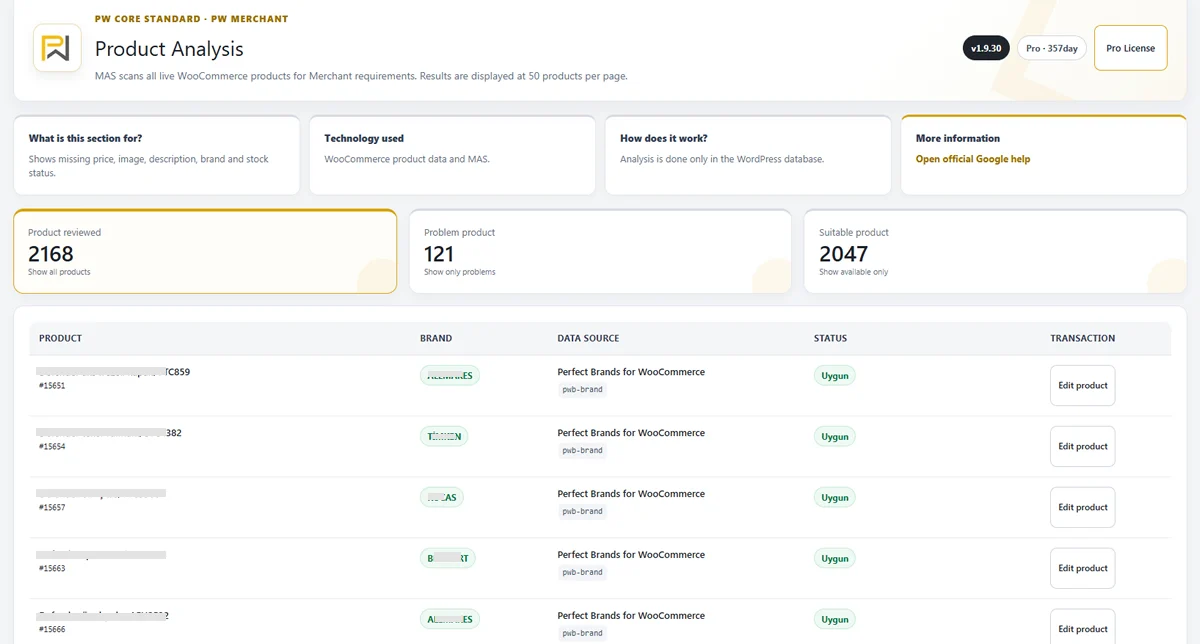
A product may look complete on the storefront while still containing information that requires attention for Merchant use.
For example, a product may have a title and price but no suitable image. Another product may have an image but an incomplete description. A variable product may contain different prices or stock conditions across its variations. A product identifier or brand value may be missing when it is relevant.
PW Merchant helps review the available product information and organise the results in a more understandable way.
The plugin can help you see:
- How many products have been examined.
- How many products appear suitable.
- How many products contain issues.
- How many products contain critical problems.
- Which product areas may require attention.
- Which products should be reviewed first.
This overview is particularly valuable for large WooCommerce catalogues.
Without a structured review, store owners may need to open products one by one and search for missing information manually. This can take a significant amount of time and still leave important issues unnoticed.
Understanding suitable products
A suitable product is generally a product that contains the essential information expected for the intended Merchant operation, based on the available review conditions.
This does not mean that Google will automatically approve the product.
Google Merchant Center uses its own policies, automated controls and review systems. Account status, business information, website quality, regional settings and policy compliance can also affect product processing.
The suitable classification is therefore a product management indicator within PW Merchant. It helps users identify products that appear better prepared than products with visible warnings or critical data problems.

Suitable products can be prioritised for the next supported operation, while products requiring attention can remain outside that process until corrections are completed.
This provides greater control over the catalogue and reduces the need to process every product without review.
Understanding problematic products
A problematic product may contain incomplete, inconsistent or potentially unsuitable information.
The issue may not always prevent every operation, but it should be reviewed by the store owner.
Examples may include incomplete product descriptions, missing optional information, questionable image conditions or inconsistencies between product fields.
The purpose of this classification is to help users notice conditions that might otherwise remain hidden inside a large catalogue.
A warning should not always be treated as a final rejection. It should be understood as a reason to examine the relevant product more carefully.
After the necessary correction is made in WooCommerce, the product can be reviewed again through PW Merchant.
This creates a practical correction cycle:
- Detect the issue.
- Open the relevant WooCommerce product.
- Review the affected field.
- Make the necessary correction.
- Save the product.
- Run the product review again.
- Confirm whether the issue has been resolved.
Understanding critical products
A critical product contains an issue that may require immediate attention before the product continues through the intended Merchant workflow.
Critical conditions may involve essential data that is missing, inaccessible or clearly inconsistent.

Examples may include the absence of an important product image, an invalid product page, unavailable price information or another condition that can prevent meaningful processing.
Critical products should normally be reviewed before problematic or suitable products.
This priority system helps store owners use their time more efficiently. Instead of reviewing the catalogue randomly, they can begin with products that are more likely to create serious interruptions.
PW Merchant helps turn a large and unorganised catalogue into a more manageable list of priorities.
The critical classification does not replace Google Merchant Center feedback. It serves as an early product management signal inside the WooCommerce environment.
Correcting product information in WooCommerce
When PW Merchant identifies a possible product issue, the actual product data should normally be corrected in WooCommerce.
This keeps the store catalogue consistent and ensures that the visible product page reflects the maintained product information.
For example, when an image is missing, the image should be added to the WooCommerce product. When a description is incomplete, it should be improved through the product editing screen. When the price is incorrect, the standard WooCommerce price fields should be checked.
This principle is important because Merchant data should not become disconnected from the website.
The information presented to customers on the product page should remain consistent with the information used during Merchant operations.

After a correction is saved, PW Merchant can review the product again and update its general condition according to the available data.
Selecting products for Merchant operations
Not every product needs to be processed at the same time.
A store owner may want to begin with a specific category, a limited product group or products that have already passed the internal review.
PW Merchant is designed to support a controlled approach instead of forcing the user to manage the entire catalogue through a single uncontrolled action.
This can be useful when:
- The store contains thousands of products.
- Only a specific category should be processed.
- New products need to be managed separately.
- Previously problematic products have been corrected.
- Seasonal products need priority.
- The store owner wants to test the process with a smaller group first.
A controlled start helps users understand the workflow before managing larger catalogue operations.
It can also reduce unnecessary server pressure and make results easier to evaluate.
Starting an immediate operation
Some operations may need to begin immediately.
For example, a store owner may have corrected a small group of products and want to process them without delay.

PW Merchant can support an immediate workflow for suitable operation types.
The user starts the relevant process from the plugin interface, and the plugin manages the technical communication in the background.
During or after the operation, available status information helps the user understand whether the process completed successfully or requires further attention.
Immediate operations are useful for smaller tasks, urgent corrections or limited product groups.
For large catalogues, scheduled processing may be more appropriate.
Scheduling large product operations
WooCommerce stores with large product catalogues need to consider server resources and website traffic.
Processing a large number of products during a busy period may place additional pressure on the server. This can affect administration performance and, depending on the hosting environment, may increase the risk of interrupted tasks.
PW Merchant uses a planning-oriented approach for demanding operations.
Users may be able to select a more suitable time, such as a quieter period or night-time window, depending on the available scheduling options.
This provides several benefits:

- Large tasks can run outside peak visitor hours.
- Server resources can be used more carefully.
- Store administrators can plan work in advance.
- Results can be reviewed after the scheduled process.
- Daily store management can continue with less interruption.
Scheduling does not automatically remove all hosting limitations. The server still needs sufficient resources, and external services may occasionally respond slowly or become temporarily unavailable.
However, planned processing creates a more professional and manageable workflow.
Background and batch processing
Long-running product operations should not depend entirely on keeping a browser page open.
PW Merchant is designed to manage demanding tasks through controlled background and batch-oriented processes where supported.
Batch processing means dividing a large task into smaller, manageable groups instead of trying to complete every product in one request.
This approach can improve stability and make large catalogue operations easier to follow.
It also helps reduce the risk created by PHP execution limits, server timeouts and browser interruptions.
The exact performance of any operation depends on several factors, including:
- The number of WooCommerce products.
- The complexity of product variations.
- The hosting environment.
- Available server memory and processor resources.
- Database performance.
- External API response time.
- Other active plugins and scheduled tasks.
PW Merchant aims to manage these conditions responsibly, but no plugin can completely remove the limitations of an unsuitable server environment.
Monitoring operation progress
Users need visibility during product operations.
Starting a process without knowing what is happening creates uncertainty, especially when the catalogue contains many products.
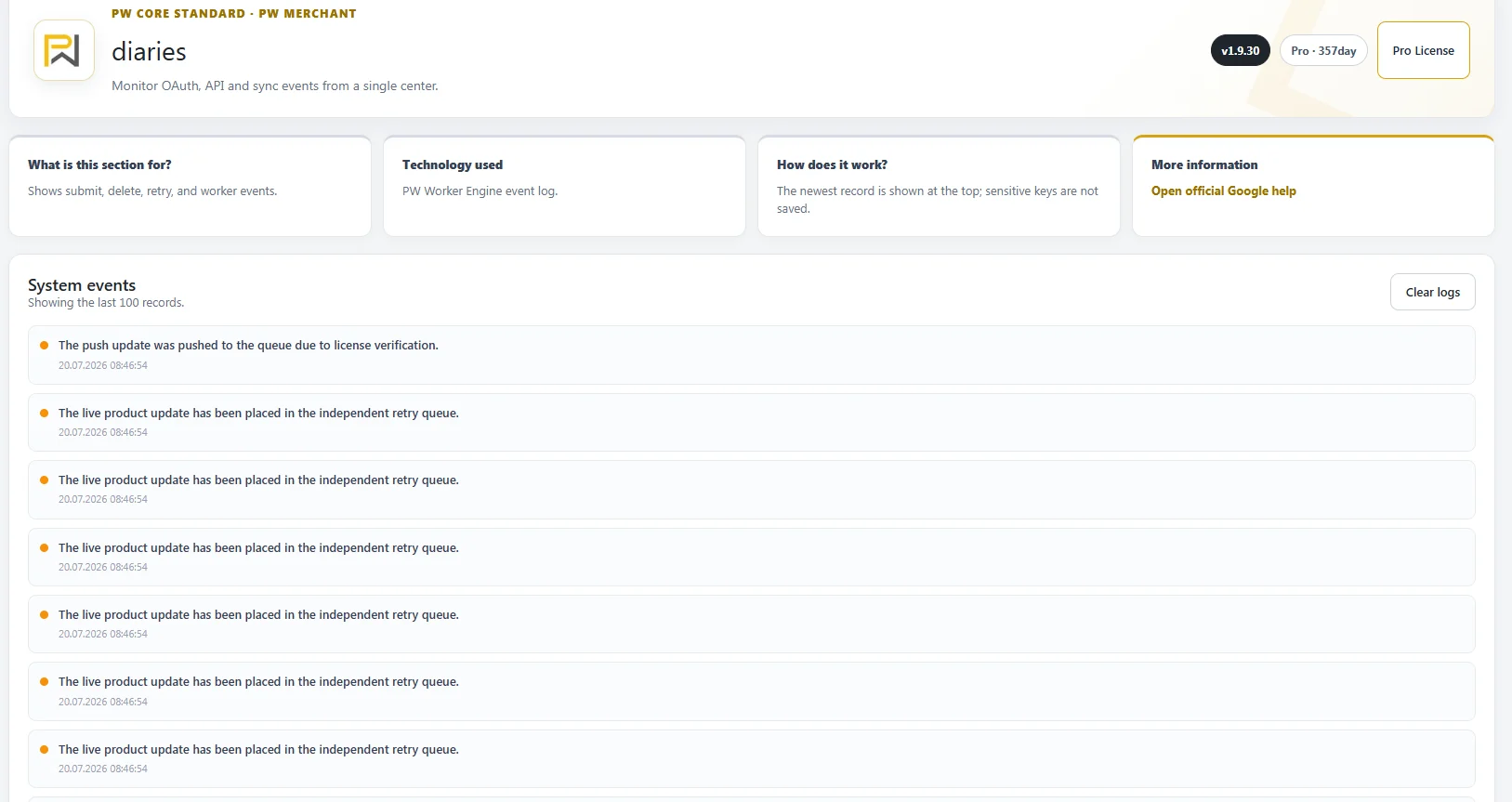
PW Merchant helps present available progress and result information through the plugin interface.
Depending on the relevant process, the user may see details such as:
- The number of products examined.
- The number of completed products.
- The number of suitable products.
- The number of problematic products.
- The number of critical products.
- The number of successful operations.
- The number of failed or interrupted operations.
These figures help the user understand the general condition of the process.
They also provide a foundation for deciding whether another review, correction or operation is required.
Reviewing Merchant responses and issues
External systems may return warnings, errors or status information during product operations.
Some responses are easy to understand, while others may contain technical terms or policy-related explanations.
PW Merchant aims to present available issue information in a more useful way.
The goal is to help users understand which product was affected, what general type of problem occurred and which area may need attention.
Not every Google response can be rewritten or simplified completely. Some issues depend on account configuration, policy review or external systems that operate outside WordPress.
However, clearer issue visibility can help users avoid repeating the same operation without understanding the underlying problem.

Repeating a product review after changes
Product catalogues are not static.
Prices change. Stock levels change. New images are uploaded. Product descriptions are improved. Variations are added or removed. Products are discontinued, and new products are created.
For this reason, product review is not a one-time task.
PW Merchant can be used as part of a recurring product management process.
After important changes are made in WooCommerce, the affected products can be reviewed again.
This helps store owners maintain greater visibility over the catalogue and detect new problems before they become part of a larger Merchant operation.
A regular review process is particularly useful for stores that:
- Update prices frequently.
- Manage rapidly changing stock.
- Add new products every day.
- Work with many product variations.
- Import products from other systems.
- Use multiple staff members for catalogue management.
How licensing works for the user
PW Merchant uses a controlled licensing system to support authorised installation, original software distribution, supported updates and continued product assistance.
The user does not need to manage the technical licence infrastructure.
The plugin is activated for the authorised website according to the licence conditions. Licence status and access are then managed through the supported workflow.
This structure helps provide:
- Authorised domain-based use.
- Access to original plugin packages.
- Controlled software updates.
- Reduced risk from modified packages.
- Clearer licence status management.
- Continued compatibility and product support.
The purpose of the licensing structure is not to complicate the plugin experience. It is intended to create a safer and more sustainable relationship between the customer and the installed software.
A complete PW Merchant workflow
A complete PW Merchant process can be summarised as follows:
- Prepare the WooCommerce store and Google Merchant Center account.
- Install and activate the authorised PW Merchant package.
- Complete the supported licence verification.
- Establish the Google Merchant connection.
- Review the WooCommerce product catalogue.
- Separate suitable, problematic and critical products.
- Correct missing or inconsistent information in WooCommerce.
- Review corrected products again.
- Select the products intended for the next operation.
- Start the operation immediately or schedule it for a suitable time.
- Monitor progress and operation results.
- Review warnings and external Merchant responses.
- Repeat reviews when catalogue information changes.
PW Merchant turns product management into a repeatable workflow: review, identify, correct, process and monitor.
Why this workflow matters
Google Merchant Center management can become difficult when products are processed without preparation, classification or monitoring.
PW Merchant helps create order inside this process.
It gives WooCommerce store owners a clearer view of their catalogue, helps them focus on important product issues and supports more controlled API-based operations.
The plugin does not replace accurate product information, correct account settings or compliance with Google policies.
Instead, it provides the tools needed to manage these responsibilities more effectively.
By combining WooCommerce product data, catalogue review, issue classification, scheduled operations, progress visibility and authorised software support, PW Merchant creates a more professional foundation for Google Merchant Center management.
This is how PW Merchant works: it helps store owners move from unstructured product transfer to a guided and manageable Merchant workflow.